In my previous articles from the series “Design Patterns in Automated Testing”, I explained in details how to improve your test automation framework through the implementation of Page Objects, Facades and Singletons. Here I am going to extend further the ideas of the Page Object Pattern. More efficient usage and improved readability are achievable through the incorporation of the Page Objects with Fluent API. The result will be Fluent Page Objects or Fluent Page Object Pattern.
Fluent Interface
Definition
In software engineering, a fluent interface (as first coined by Eric Evans and Martin Fowler) is an implementation of an object-oriented API that aims to provide the most readable code.A fluent interface is typically implemented by using method cascading (concretely method chaining) to relay the instruction context of a subsequent call (but a fluent interface entails more than just method chaining). The context is defined through the return value of a called method-self-referential, where the new context is equivalent to the last context. Self-referential, where the new context is equivalent to the last contest terminated by the return of a void context. Terminated by the return of a void context.
UML Class Diagram
classDiagram
    BaseSingleton~T~ <|-- BasePage~TElementMap,TPageValidator~
    BasePage~TElementMap,TPageValidator~ <|-- SearchEngineMainPage
    BasePage~TElementMap,TPageValidator~ o-- BaseElementMap
    BasePage~TElementMap,TPageValidator~ o-- BasePageValidator~TElementMap~
    BaseElementMap <|-- SearchEngineElementMap
    BasePageValidator~TElementMap~ <|-- SearchEnginePageValidator
    class BaseSingleton~T~ {
        +T Instance
    }
    class BasePage~TElementMap,TPageValidator~ {
        +TElementMap Map
        +TPageValidator Validate()
        +Navigate(string url)
    }
    class SearchEngineMainPage {
        +Search(string text)
        +Navigate()
    }
    class BaseElementMap {
        +IWebDriver Driver
    }
    class SearchEngineElementMap {
        +IWebElement SearchBox
        +IWebElement GoButton
    }
    class BasePageValidator~TElementMap~ {
        +TElementMap Map
    }
    class SearchEnginePageValidator {
        +AssertResultsCount(string expected)
    }
Participants
The classes and objects participating in this pattern are:
-
Page Objects (SearchEngineMainPage)
Holds the actions that can be performed on the page like Search and Navigate. It exposes an easy access to the Page Validator through the Validate() method. The best implementations of the pattern hide the usage of the Element Map, wrapping it through all action methods.
-
BasePage
Gives access to the child’s page element map class and defines a standard navigation operation.
-
BasePage
Adds an instance to the child page’s validator class through the Validate method.
-
BaseSingleton
This is an abstract class that contains a static property of its child instance BaseSingleton - This is an abstract class that holds a static property of its child instance.
-
BaseElementMap
Provides easier access to current browser and functions to switch between different frames.
-
BasePageValidator
Gives all child validators instance to the current element map and the page object itself
While ago we were working on the first version of the BELLATRIX test automation framework, I did this research so that we can find the most convenient way for creating page objects.
Fluent Page Object Pattern C# Code
Test’s Test Case
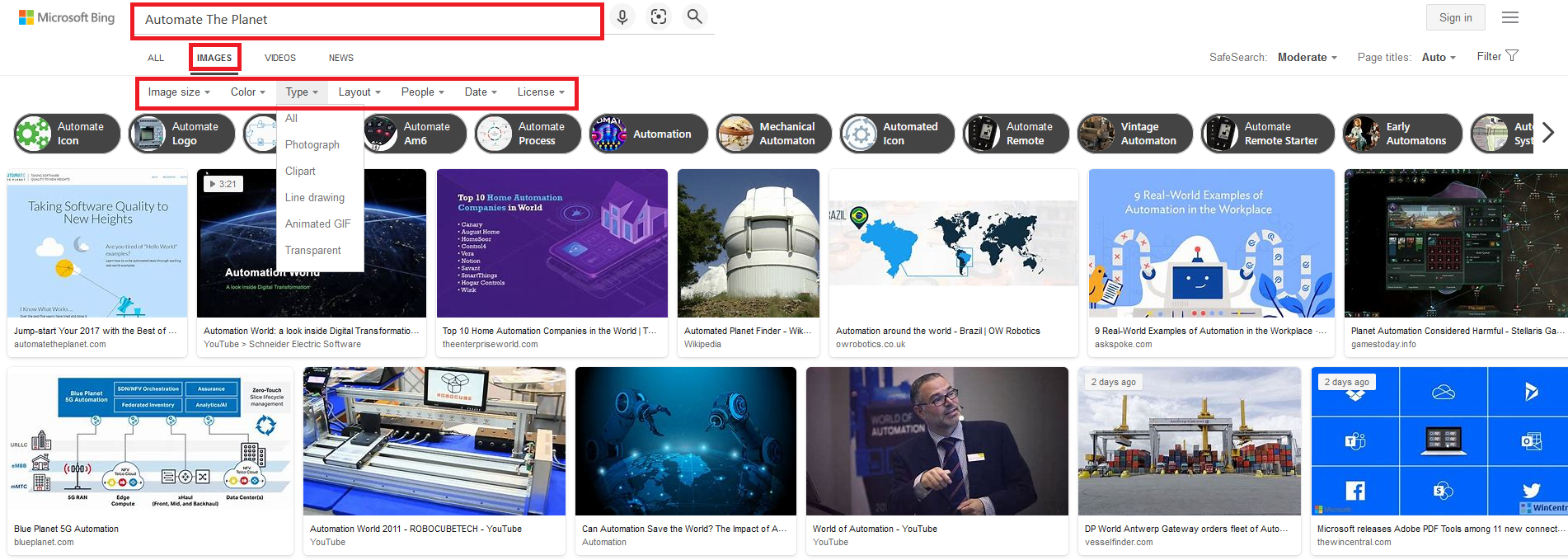
Fluent Page Objects Implementation Code
If we don’t use Fluent Page Objects, our test looks like the code below.
public class FluentSearchEngineTests
{

    public void SetupTest()
    {
        Driver.StartBrowser();
    }


    public void TeardownTest()
    {
        Driver.StopBrowser();
    }


    public void SearchForImageNotFuent()
    {
        P.SearchEngineMainPage searchEngineMainPage = new P.SearchEngineMainPage();
        searchEngineMainPage.Navigate();
        searchEngineMainPage.Search("facebook");
        searchEngineMainPage.ClickImages();
        searchEngineMainPage.SetSize(Sizes.Large);
        searchEngineMainPage.SetColor(Colors.BlackWhite);
        searchEngineMainPage.SetTypes(Types.Clipart);
        searchEngineMainPage.SetPeople(People.All);
        searchEngineMainPage.SetDate(Dates.PastYear);
        searchEngineMainPage.SetLicense(Licenses.All);
    }
}
The primary goal of the Fluent Page Object Pattern is to enable you to use the power of method chaining. To achieve it, the SearchEngineMainPage should be slightly modified.
public class SearchEngineMainPage :
BaseFluentPageSingleton<
    SearchEngineMainPage,
    SearchEngineMainPageElementMap,
    SearchEngineMainPageValidator>
{
    public SearchEngineMainPage Navigate(string url = "searchEngineUrl")
    {
        base.Navigate(url);
        return this;
    }

    public SearchEngineMainPage Search(string textToType)
    {
        this.Map.SearchBox.Clear();
        this.Map.SearchBox.SendKeys(textToType);
        this.Map.GoButton.Click();
        return this;
    }

    public SearchEngineMainPage ClickImages()
    {
        this.Map.ImagesLink.Click();
        return this;
    }

    public SearchEngineMainPage SetSize(Sizes size)
    {
        this.Map.Sizes.SelectByIndex((int)size);
        return this;
    }

    public SearchEngineMainPage SetColor(Colors color)
    {
        this.Map.Color.SelectByIndex((int)color);
        return this;
    }

    public SearchEngineMainPage SetTypes(Types type)
    {
        this.Map.Type.SelectByIndex((int)type);
        return this;
    }

    public SearchEngineMainPage SetLayout(Layouts layout)
    {
        this.Map.Layout.SelectByIndex((int)layout);
        return this;
    }

    public SearchEngineMainPage SetPeople(People people)
    {
        this.Map.People.SelectByIndex((int)people);
        return this;
    }

    public SearchEngineMainPage SetDate(Dates date)
    {
        this.Map.Date.SelectByIndex((int)date);
        return this;
    }

    public SearchEngineMainPage SetLicense(Licenses license)
    {
        this.Map.License.SelectByIndex((int)license);
        return this;
    }
}
The most important part of the above code is that all methods return the current instance of the page.
return this;Not quietly related to the pattern itself but interesting to point here is the way of choosing the different options. All of them are of type SelectElement. Here are the different settings elements that you can discover in the SearchEngineMainPageMap.
public SelectElement Sizes
{
    get
    {
        return new SelectElement(this.browser.FindElement(By.XPath("//div/ul/li/span/span[text() = 'Size']")));
    }
}

public SelectElement Color
{
    get
    {
        return new SelectElement(this.browser.FindElement(By.XPath("//div/ul/li/span/span[text() = 'Color']")));
    }
}

public SelectElement Type
{
    get
    {
        return new SelectElement(this.browser.FindElement(By.XPath("//div/ul/li/span/span[text() = 'Type']")));
    }
}

public SelectElement Layout
{
    get
    {
        return new SelectElement(this.browser.FindElement(By.XPath("//div/ul/li/span/span[text() = 'Layout']")));
    }
}

public SelectElement People
{
    get
    {
        return new SelectElement(this.browser.FindElement(By.XPath("//div/ul/li/span/span[text() = 'People']")));
    }
}

public SelectElement Date
{
    get
    {
        return new SelectElement(this.browser.FindElement(By.XPath("//div/ul/li/span/span[text() = 'Date']")));
    }
}

public SelectElement License
{
    get
    {
        return new SelectElement(this.browser.FindElement(By.XPath("//div/ul/li/span/span[text() = 'License']")));
    }
}
public enum Dates
{
All,
Past24Hours,
PastWeek,
PastMonth,
PastYear
}This way the chosen enum value represents an integer from 0-4 that is the same as the index of the same values in the select element.
public SearchEngineMainPage SetDate(Dates date)
{
    this.Map.Date.SelectByIndex((int)date);
    return this;
}
For more detailed overview and usage of many more design patterns and best practices in automated testing, check my book “Design Patterns for High-Quality Automated Tests, C# Edition, High-Quality Tests Attributes, and Best Practices”. You can read part of three of the chapters:
Defining High-Quality Test Attributes for Automated Tests
Benchmarking for Assessing Automated Test Components Performance
Generic Repository Design Pattern- Test Data Preparation
Create Fluent Page Validator
In order to keep the method chaining available even after a usage of validation methods, a modification of the BasePageValidator is mandatory too.
Not Fluent Version
public class BasePageValidator<M>
    where M : BasePageElementMap, new()
{
    protected M Map
    {
        get
        {
            return new M();
        }
    }
}
Fluent Version
public class BasePageValidator<S, M, V>
    where S : BaseFluentPageSingleton<S, M, V>
    where M : BasePageElementMap, new()
    where V : BasePageValidator<S, M, V>, new()
{
    protected S pageInstance;

    public BasePageValidator(S currentInstance)
    {
        this.pageInstance = currentInstance;
    }

    public BasePageValidator()
    {
    }

    protected M Map
    {
        get
        {
            return new M();
        }
    }
}
public class BingMainPageValidator : BasePageValidator<BingMainPageElementMap>
{
public void ResultsCount(string expectedCount)
{
Assert.IsTrue(this.Map.ResultsCountDiv.Text.Contains(expectedCount), "The results DIV doesn't contains the specified text.");
}
}Fluent SearchEngineMainPageValidator
public class SearchEngineMainPageValidator :
BasePageValidator<
    SearchEngineMainPage,
    SearchEngineMainPageElementMap,
    SearchEngineMainPageValidator>
{
    public SearchEngineMainPage ResultsCount(string expectedCount)
    {
        Assert.IsTrue(this.Map.ResultsCountDiv.Text.Contains(expectedCount),
        "The results DIV doesn't contains the specified text.");
        return this.pageInstance;
    }
}
Because of the changes in the BasePageValidator the BagePage classes should be modified to support the new fluent base validator.
public abstract class BaseFluentPageSingleton<S, M> : ThreadSafeNestedContructorsBaseSingleton<S>
    where M : BasePageElementMap, new()
    where S : BaseFluentPageSingleton<S, M>
{
    protected M Map
    {
        get
        {
            return new M();
        }
    }

    public virtual void Navigate(string url = "")
    {
        Driver.Browser.Navigate().GoToUrl(string.Concat(url));
    }
}

public abstract class BaseFluentPageSingleton<S, M, V> : BaseFluentPageSingleton<S, M>
    where M : BasePageElementMap, new()
    where S : BaseFluentPageSingleton<S, M, V>
    where V : BasePageValidator<S, M, V>, new()
{
    public V Validate()
    {
        return new V();
    }
}
Fluent Page Objects Usage in Tests
public class FluentSearchEngineTests
{

    public void SetupTest()
    {
        Driver.StartBrowser();
    }


    public void TeardownTest()
    {
        Driver.StopBrowser();
    }


    public void SearchForImageFuent()
    {
        P.SearchEngineMainPage.Instance
                            .Navigate()
                            .Search("automate")
                            .ClickImages()
                            .SetSize(Sizes.Large)
                            .SetColor(Colors.BlackWhite)
                            .SetTypes(Types.Clipart)
                            .SetPeople(People.All)
                            .SetDate(Dates.PastYear)
                            .SetLicense(Licenses.All);
    }
}
The fluent page objects significantly improve the readability of tests. Also, it is quite easy to write tests, thanks to the method chaining.