
Have you had this problem to try to automate custom-tuned web controls? Probably, your team has purchased these from some dedicated UI controls vendor. There are a lot of them on the market. My team develops the backend systems of our company and for the UI parts we are using the Telerik’s controls. As you can guess, I needed to automate most of these custom controls. The approach that I am going to share with you in this article applies to all tuned controls no matter the vendor. Here I am going to show you how to automate Telerik Kendo Grid control.
Automate Custom-Tuned Web Controls WebDriver + JavaScript
To automate these controls I used Selenium WebDriver and the JavaScript API, provided by the controls’ vendor. Most of the web controls on the market expose their UI JavaScript API. Another approach is to try to automate them through the regular WebDriver functions, but usually this never works because these type of controls depend heavily on JavaScript.
Automation Use Case
In the examples, I am going to automate the Telerik Kendo Grid control.
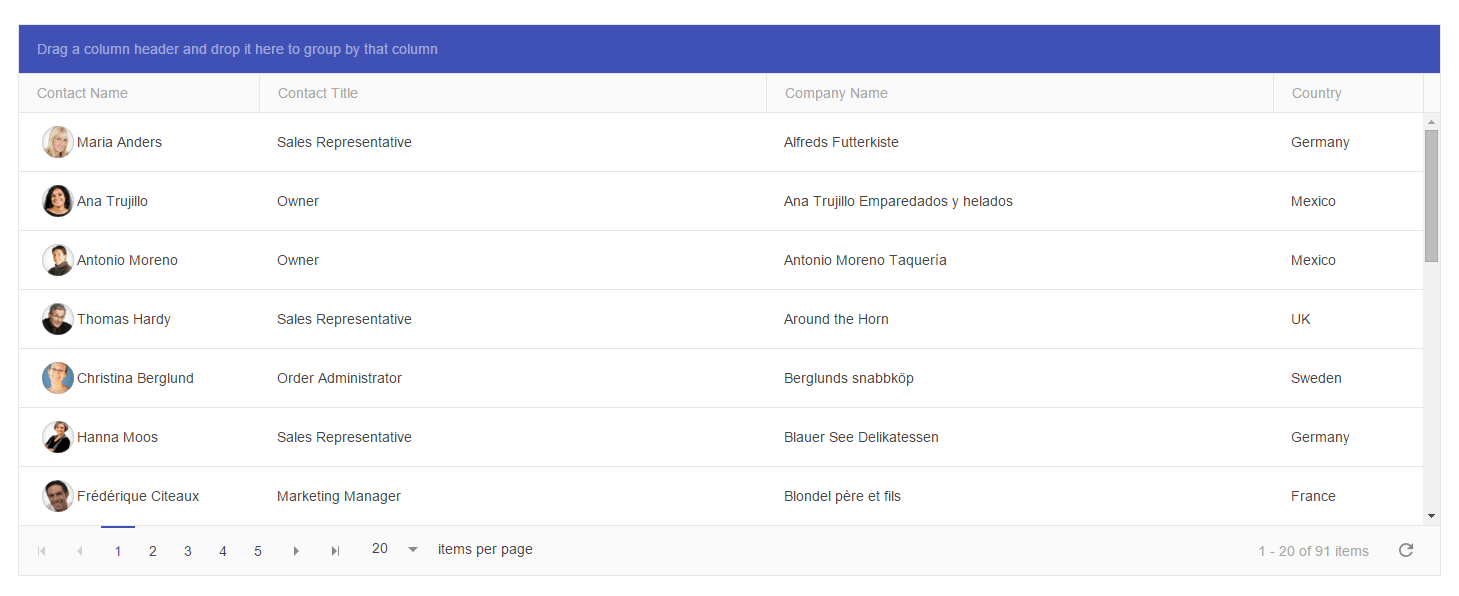
Automate Telerik Kendo Grid
Create Kendo Grid Element
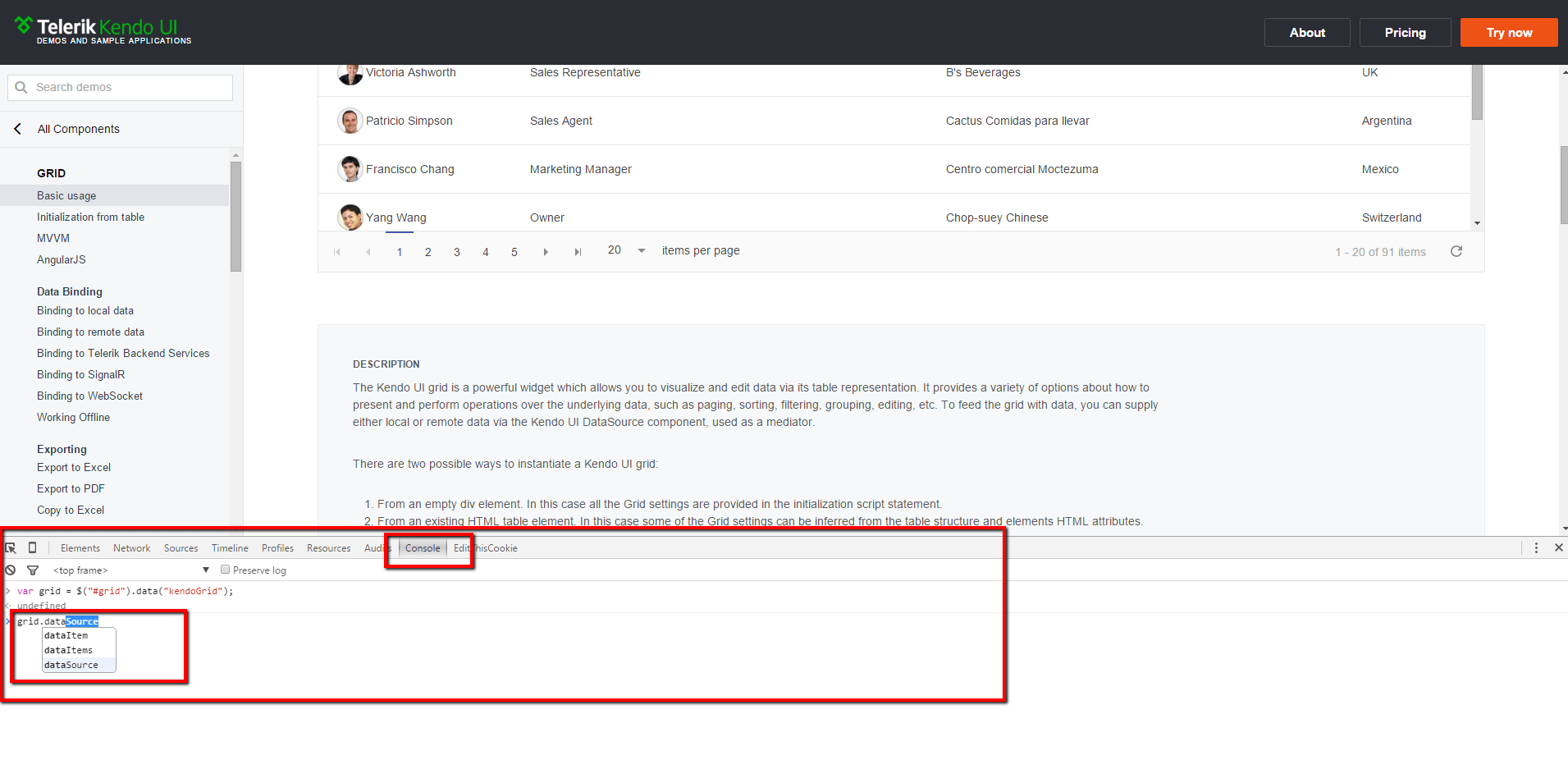
public class KendoGrid
{
    private readonly string gridId;
    private readonly IJavaScriptExecutor driver;

    public KendoGrid(IWebDriver driver, IWebElement gridDiv)
    {
        this.gridId = gridDiv.GetAttribute("id");
        this.driver = (IJavaScriptExecutor)driver;
    }

    public void NavigateToPage(int pageNumber)
    {
        string jsToBeExecuted = this.GetGridReference();
        jsToBeExecuted = string.Concat(jsToBeExecuted, "grid.dataSource.page(", pageNumber, ");");
        this.driver.ExecuteScript(jsToBeExecuted);
    }

    private string GetGridReference()
    {
        string initializeKendoGrid = string.Format("var grid = $('#{0}').data('kendoGrid');", this.gridId);

        return initializeKendoGrid;
    }
}
All operations are executed through the JavaScript executor of WebDriver, because of that the first parameter of the new element is the WebDriver’s instance. It is cast in the constructor to IJavaScriptExecutor. The second parameter is the wrapper DIV element of the grid. We pass it to the constructor only to get its ID.
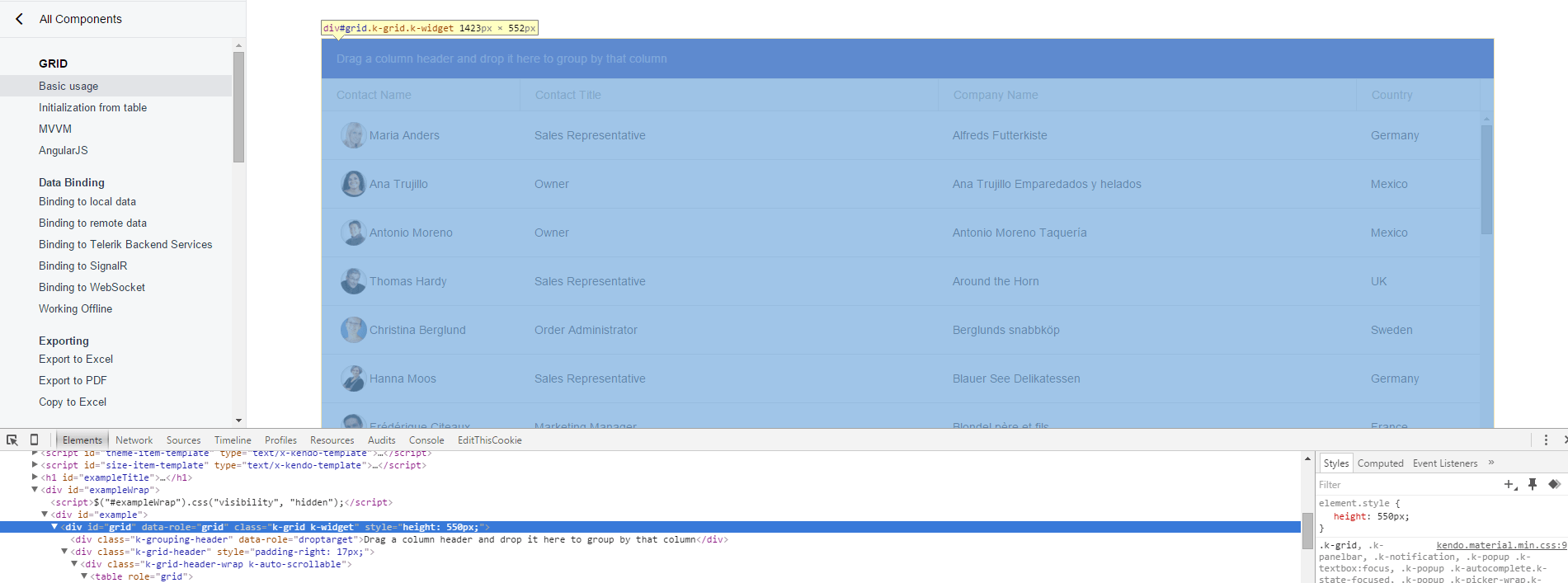
With the following JS code, we can get an instance of Kendo Grid.
var grid = $("#grid").data("kendoGrid");This code is wrapped in the GetGridReference method. It is later called before any other API’s methods.
grid.dataSource.page("5");The above JS code is used to navigate to a particular grid page. It is wrapped in the NavigateToPage method.
While ago when we were working on the first version of the BELLATRIX test automation framework, I did this research while I was working on a similar feature for our solution.
Add More Methods to Kendo Grid Element
This is the skeleton of the Kendo Grid element. You can add as many methods as you need. Below I am going to show you the most interesting ones and their usage in tests.
Sort
public void Sort(string columnName, SortType sortType)
{
    string jsToBeExecuted = this.GetGridReference();
    jsToBeExecuted = string.Concat(jsToBeExecuted, "grid.dataSource.sort({field: '", columnName, "', dir: '", sortType.ToString().ToLower(), "'});");
    this.driver.ExecuteScript(jsToBeExecuted);
}
Just pass the name of the column that you want to sort and choose between Asc and Desc sorting.
Change Page Size
public void ChangePageSize(int newSize)
{
    string jsToBeExecuted = this.GetGridReference();
    jsToBeExecuted = string.Concat(jsToBeExecuted, "grid.dataSource.pageSize(", newSize, ");");
    this.driver.ExecuteScript(jsToBeExecuted);
}
You can show more items in the grid by just passing the new number as a parameter.
GetItems
One of the most unusual methods is GetItems. The JavaScript method returns a JSON representation of the data items in the grid. After that, we deserialize it to a list of C# objects. Next, you can perform different actions and validations on them.
public List<T> GetItems<T>() where T : class
{
    string jsToBeExecuted = this.GetGridReference();
    jsToBeExecuted = string.Concat(jsToBeExecuted, "return JSON.stringify(grid.dataSource.data());");
    var jsResults = this.driver.ExecuteScript(jsToBeExecuted);
    var items = JsonConvert.DeserializeObject<List<T>>(jsResults.ToString());
    return items;
}
Filter
public void Filter(string columnName, FilterOperator filterOperator, string filterValue)
{
    this.Filter(new GridFilter(columnName, filterOperator, filterValue));
}

public void Filter(params GridFilter[] gridFilters)
{
    string jsToBeExecuted = this.GetGridReference();
    StringBuilder sb = new StringBuilder();
    sb.Append(jsToBeExecuted);
    sb.Append("grid.dataSource.filter({ logic: \"and\", filters: [");
    foreach (var currentFilter in gridFilters)
    {
        DateTime filterDateTime;
        bool isFilterDateTime = DateTime.TryParse(currentFilter.FilterValue, out filterDateTime);
        string filterValueToBeApplied =
                                        isFilterDateTime ? string.Format("new Date({0}, {1}, {2})", filterDateTime.Year, filterDateTime.Month - 1, filterDateTime.Day) :
                                        string.Format("\"{0}\"", currentFilter.FilterValue);
        string kendoFilterOperator = this.ConvertFilterOperatorToKendoOperator(currentFilter.FilterOperator);
        sb.Append(string.Concat("{ field: \"", currentFilter.ColumnName, "\", operator: \"", kendoFilterOperator, "\", value: ", filterValueToBeApplied, " },"));
    }
    sb.Append("] });");
    jsToBeExecuted = sb.ToString().Replace(",]", "]");
    this.driver.ExecuteScript(jsToBeExecuted);
}

private string ConvertFilterOperatorToKendoOperator(FilterOperator filterOperator)
{
    string kendoFilterOperator = string.Empty;
    switch (filterOperator)
    {
        case FilterOperator.EqualTo:
            kendoFilterOperator = "eq";
            break;
        case FilterOperator.NotEqualTo:
            kendoFilterOperator = "neq";
            break;
        case FilterOperator.LessThan:
            kendoFilterOperator = "lt";
            break;
        case FilterOperator.LessThanOrEqualTo:
            kendoFilterOperator = "lte";
            break;
        case FilterOperator.GreaterThan:
            kendoFilterOperator = "gt";
            break;
        case FilterOperator.GreaterThanOrEqualTo:
            kendoFilterOperator = "gte";
            break;
        case FilterOperator.StartsWith:
            kendoFilterOperator = "startswith";
            break;
        case FilterOperator.EndsWith:
            kendoFilterOperator = "endswith";
            break;
        case FilterOperator.Contains:
            kendoFilterOperator = "contains";
            break;
        case FilterOperator.NotContains:
            kendoFilterOperator = "doesnotcontain";
            break;
        case FilterOperator.IsAfter:
            kendoFilterOperator = "gt";
            break;
        case FilterOperator.IsAfterOrEqualTo:
            kendoFilterOperator = "gte";
            break;
        case FilterOperator.IsBefore:
            kendoFilterOperator = "lt";
            break;
        case FilterOperator.IsBeforeOrEqualTo:
            kendoFilterOperator = "lte";
            break;
        default:
            throw new ArgumentException("The specified filter operator is not supported.");
    }

    return kendoFilterOperator;
}
Another interesting and a little bit complicated logic is the filtering. There are two overloads of the Filter C# wrapper. The first applies a single filter. The second one can be used to apply multiple ones. If dates need to be filtered the code creates new JS date objects otherwise the JS’s filter function won’t work. You can use the FilterOperator enum to choose the filter type. Later it is converted to the API’s version.
public enum FilterOperator
{
    EqualTo,
    NotEqualTo,
    LessThan,
    LessThanOrEqualTo,
    GreaterThan,
    GreaterThanOrEqualTo,
    StartsWith,
    EndsWith,
    Contains,
    NotContains,
    IsAfter,
    IsAfterOrEqualTo,
    IsBefore,
    IsBeforeOrEqualTo
}
Kendo Grid Element Full Source Code
public class KendoGrid
{
    private readonly string gridId;
    private readonly IJavaScriptExecutor driver;

    public KendoGrid(IWebDriver driver, IWebElement gridDiv)
    {
        this.gridId = gridDiv.GetAttribute("id");
        this.driver = (IJavaScriptExecutor)driver;
    }

    public void RemoveFilters()
    {
        string jsToBeExecuted = this.GetGridReference();
        jsToBeExecuted = string.Concat(jsToBeExecuted, "grid.dataSource.filter([]);");
        this.driver.ExecuteScript(jsToBeExecuted);
    }

    public int TotalNumberRows()
    {
        string jsToBeExecuted = this.GetGridReference();
        jsToBeExecuted = string.Concat(jsToBeExecuted, "grid.dataSource.total();");
        var jsResult = this.driver.ExecuteScript(jsToBeExecuted);
        return int.Parse(jsResult.ToString());
    }

    public void Reload()
    {
        string jsToBeExecuted = this.GetGridReference();
        jsToBeExecuted = string.Concat(jsToBeExecuted, "grid.dataSource.read();");
        this.driver.ExecuteScript(jsToBeExecuted);
    }

    public int GetPageSize()
    {
        string jsToBeExecuted = this.GetGridReference();
        jsToBeExecuted = string.Concat(jsToBeExecuted, "return grid.dataSource.pageSize();");
        var currentResponse = this.driver.ExecuteScript(jsToBeExecuted);
        int pageSize = int.Parse(currentResponse.ToString());
        return pageSize;
    }

    public void ChangePageSize(int newSize)
    {
        string jsToBeExecuted = this.GetGridReference();
        jsToBeExecuted = string.Concat(jsToBeExecuted, "grid.dataSource.pageSize(", newSize, ");");
        this.driver.ExecuteScript(jsToBeExecuted);
    }

    public void NavigateToPage(int pageNumber)
    {
        string jsToBeExecuted = this.GetGridReference();
        jsToBeExecuted = string.Concat(jsToBeExecuted, "grid.dataSource.page(", pageNumber, ");");
        this.driver.ExecuteScript(jsToBeExecuted);
    }

    public void Sort(string columnName, SortType sortType)
    {
        string jsToBeExecuted = this.GetGridReference();
        jsToBeExecuted = string.Concat(jsToBeExecuted, "grid.dataSource.sort({field: '", columnName, "', dir: '", sortType.ToString().ToLower(), "'});");
        this.driver.ExecuteScript(jsToBeExecuted);
    }

    public List<T> GetItems<T>() where T : class
    {
        string jsToBeExecuted = this.GetGridReference();
        jsToBeExecuted = string.Concat(jsToBeExecuted, "return JSON.stringify(grid.dataSource.data());");
        var jsResults = this.driver.ExecuteScript(jsToBeExecuted);
        var items = JsonConvert.DeserializeObject<List<T>>(jsResults.ToString());
        return items;
    }

    public void Filter(string columnName, FilterOperator filterOperator, string filterValue)
    {
        this.Filter(new GridFilter(columnName, filterOperator, filterValue));
    }

    public void Filter(params GridFilter[] gridFilters)
    {
        string jsToBeExecuted = this.GetGridReference();
        StringBuilder sb = new StringBuilder();
        sb.Append(jsToBeExecuted);
        sb.Append("grid.dataSource.filter({ logic: \"and\", filters: [");
        foreach (var currentFilter in gridFilters)
        {
            DateTime filterDateTime;
            bool isFilterDateTime = DateTime.TryParse(currentFilter.FilterValue, out filterDateTime);
            string filterValueToBeApplied =
                                            isFilterDateTime ? string.Format("new Date({0}, {1}, {2})", filterDateTime.Year, filterDateTime.Month - 1, filterDateTime.Day) :
                                            string.Format("\"{0}\"", currentFilter.FilterValue);
            string kendoFilterOperator = this.ConvertFilterOperatorToKendoOperator(currentFilter.FilterOperator);
            sb.Append(string.Concat("{ field: \"", currentFilter.ColumnName, "\", operator: \"", kendoFilterOperator, "\", value: ", filterValueToBeApplied, " },"));
        }
        sb.Append("] });");
        jsToBeExecuted = sb.ToString().Replace(",]", "]");
        this.driver.ExecuteScript(jsToBeExecuted);
    }

    public int GetCurrentPageNumber()
    {
        string jsToBeExecuted = this.GetGridReference();
        jsToBeExecuted = string.Concat(jsToBeExecuted, "return grid.dataSource.page();");
        var result = this.driver.ExecuteScript(jsToBeExecuted);
        int pageNumber = int.Parse(result.ToString());
        return pageNumber;
    }

    private string GetGridReference()
    {
        string initializeKendoGrid = string.Format("var grid = $('#{0}').data('kendoGrid');", this.gridId);

        return initializeKendoGrid;
    }

    private string ConvertFilterOperatorToKendoOperator(FilterOperator filterOperator)
    {
        string kendoFilterOperator = string.Empty;
        switch (filterOperator)
        {
            case FilterOperator.EqualTo:
                kendoFilterOperator = "eq";
                break;
            case FilterOperator.NotEqualTo:
                kendoFilterOperator = "neq";
                break;
            case FilterOperator.LessThan:
                kendoFilterOperator = "lt";
                break;
            case FilterOperator.LessThanOrEqualTo:
                kendoFilterOperator = "lte";
                break;
            case FilterOperator.GreaterThan:
                kendoFilterOperator = "gt";
                break;
            case FilterOperator.GreaterThanOrEqualTo:
                kendoFilterOperator = "gte";
                break;
            case FilterOperator.StartsWith:
                kendoFilterOperator = "startswith";
                break;
            case FilterOperator.EndsWith:
                kendoFilterOperator = "endswith";
                break;
            case FilterOperator.Contains:
                kendoFilterOperator = "contains";
                break;
            case FilterOperator.NotContains:
                kendoFilterOperator = "doesnotcontain";
                break;
            case FilterOperator.IsAfter:
                kendoFilterOperator = "gt";
                break;
            case FilterOperator.IsAfterOrEqualTo:
                kendoFilterOperator = "gte";
                break;
            case FilterOperator.IsBefore:
                kendoFilterOperator = "lt";
                break;
            case FilterOperator.IsBeforeOrEqualTo:
                kendoFilterOperator = "lte";
                break;
            default:
                throw new ArgumentException("The specified filter operator is not supported.");
        }

        return kendoFilterOperator;
    }
}
Kendo Grid Element’s Usage in Tests
public class KendoGridTests
{
    private IWebDriver driver;


    public void SetupTest()
    {
        this.driver = new FirefoxDriver();
        this.driver.Manage().Timeouts().SetPageLoadTimeout(TimeSpan.FromSeconds(5));
    }


    public void TeardownTest()
    {
        this.driver.Quit();
    }


    public void FilterContactName()
    {
        this.driver.Navigate().GoToUrl(@"http://demos.telerik.com/kendo-ui/grid/index");
        var kendoGrid = new KendoGrid(this.driver, this.driver.FindElement(By.Id("grid")));
        kendoGrid.Filter("ContactName", Enums.FilterOperator.Contains, "Thomas");
        var items = kendoGrid.GetItems<GridItem>();
        Assert.AreEqual(1, items.Count);
    }


    public void SortContactTitleDesc()
    {
        this.driver.Navigate().GoToUrl(@"http://demos.telerik.com/kendo-ui/grid/index");
        var kendoGrid = new KendoGrid(this.driver, this.driver.FindElement(By.Id("grid")));
        kendoGrid.Sort("ContactTitle", SortType.Desc);
        var items = kendoGrid.GetItems<GridItem>();
        Assert.AreEqual("Sales Representative", items[0]);
        Assert.AreEqual("Sales Representative", items[1]);
    }


    public void TestCurrentPage()
    {
        this.driver.Navigate().GoToUrl(@"http://demos.telerik.com/kendo-ui/grid/index");
        var kendoGrid = new KendoGrid(this.driver, this.driver.FindElement(By.Id("grid")));
        var pageNumber = kendoGrid.GetCurrentPageNumber();
        Assert.AreEqual(1, pageNumber);
    }


    public void GetPageSize()
    {
        this.driver.Navigate().GoToUrl(@"http://demos.telerik.com/kendo-ui/grid/index");
        var kendoGrid = new KendoGrid(this.driver, this.driver.FindElement(By.Id("grid")));
        var pageNumber = kendoGrid.GetPageSize();
        Assert.AreEqual(20, pageNumber);
    }


    public void GetAllItems()
    {
        this.driver.Navigate().GoToUrl(@"http://demos.telerik.com/kendo-ui/grid/index");
        var kendoGrid = new KendoGrid(this.driver, this.driver.FindElement(By.Id("grid")));

        var items = kendoGrid.GetItems<GridItem>();
        Assert.AreEqual(91, items.Count);
    }
}
Above you can find sample test usages of the most compelling Kendo Grid Element’s methods.